
Screenshots


App details
- Updated
- Aug 30, 2011
- Language
- Spanish,English
- Developer
- Softplus
- Category
- Mobile
SoftPas in:
This product is also available in the following languages:
About Icon Searcher
Download Icon Searcher – search icons, find icons, icon finder, icon tool, icon utility, icon search software
Overview
Icon Searcher is a productivity-focused utility designed to simplify the process of locating icons stored across a user’s system. It addresses a common challenge faced by individuals working with digital shortcuts, desktop customization, or design assets—finding a specific icon quickly and efficiently. By scanning the entire hard drive, the application ensures no icon is overlooked, regardless of its file location or format. This functionality is particularly beneficial for users who manage multiple applications, custom desktop setups, or digital design projects requiring precise icon retrieval.
The tool is ideal for power users, system administrators, and digital designers who frequently need to identify or reuse icons from various sources. Its ability to operate without disrupting ongoing workflows makes it a practical addition to daily productivity routines. While the developer did not provide additional background on the organization behind the app, its long-standing presence in the software ecosystem since 2011 suggests a stable and reliable utility. Icon Searcher fills a niche in the productivity category by offering a dedicated, no-frills solution for icon discovery, enhancing efficiency in both personal and professional environments.
Key Features & Functionality
- Comprehensive Icon Search: Icon Searcher performs a full system scan to locate icons stored anywhere on the hard drive, including hidden directories and application folders. This ensures users can recover icons from legacy software, custom installations, or archived projects without manual navigation.
- Background Operation: The application runs in the background while searching, allowing users to continue working on other tasks such as document editing, coding, or web browsing without interruption. This multitasking capability supports seamless workflow continuity.
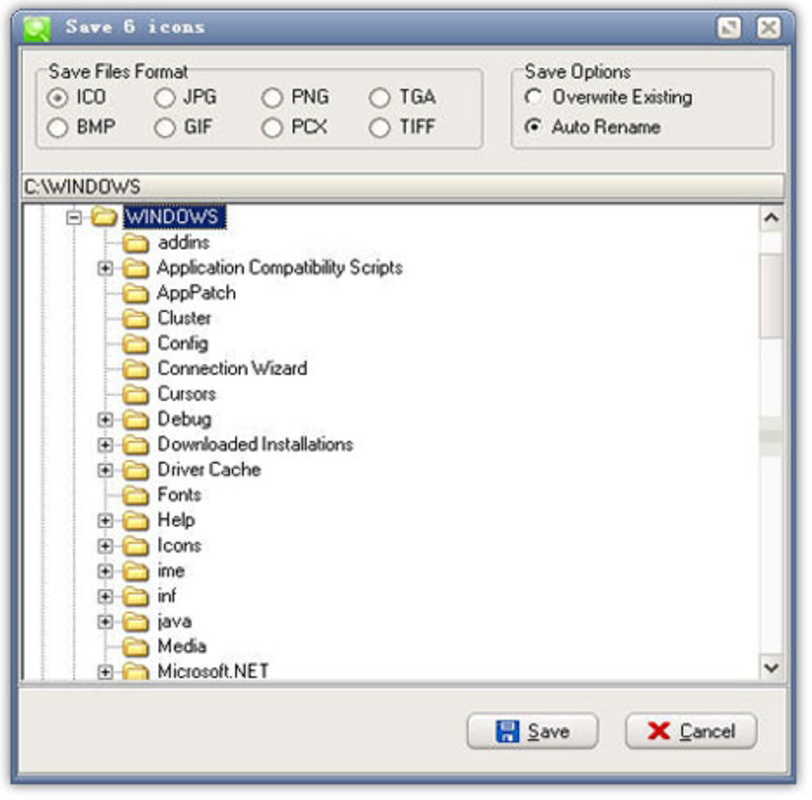
- User-Friendly Interface: Designed with simplicity in mind, the interface features clean navigation and clear result displays. Users can initiate a search with minimal effort and view results in a structured format, reducing cognitive load and search time.
- Filter Options: To manage large volumes of results, the app includes filtering tools that let users narrow down searches by file type, location, or name. This helps users quickly isolate relevant icons, especially in environments with thousands of stored assets.
For example, a designer rebuilding a desktop theme can use Icon Searcher to locate all icons from a previous project, even if they were saved in non-standard folders. Similarly, a system administrator troubleshooting a broken shortcut can search for the original icon to restore visual consistency. These practical use cases highlight the app’s value in real-world workflows.
Interface, UX & Performance
Icon Searcher presents a straightforward, no-nonsense interface focused on core functionality. The layout emphasizes clarity and efficiency, with minimal distractions. Navigation is intuitive, allowing users to start a search with a single click and view results in a well-organized list. Visual feedback during the search process indicates progress without overwhelming the user.
Although the developer did not list formal performance metrics, the application’s lightweight design—only 3.2 MB in size—suggests optimized resource usage. It is expected to operate smoothly on a wide range of Windows systems, including older hardware. Responsiveness during searches appears to be maintained, as the app supports background execution without freezing the system. Stability is implied by its long-term availability since 2011, though specific crash reports or error logs were not disclosed. Overall, the user experience is consistent with a utility tool built for reliability and efficiency.
Platform Compatibility & Technical Requirements
Icon Searcher is designed for the Windows platform, making it accessible to users on desktop operating systems. The current version is 1.0, with a file size of 3.2 MB, indicating a compact and lightweight installation. The developer did not specify minimum OS requirements, nor did they list compatibility details for newer Windows versions beyond general availability. As such, users should verify functionality on their specific system configuration.
Given its release date of 2011, the app may not support the latest Windows features or security protocols. However, its continued availability suggests it remains functional on supported systems. For users on modern Windows environments, compatibility should be tested before deployment, particularly in enterprise or high-security settings.
Pros and Cons
Pros
- Efficiently searches for icons across the entire system.
- Runs in the background, enabling uninterrupted multitasking.
- Simple and intuitive interface suitable for all user levels.
- Lightweight application with minimal system resource usage.
- Free to download and use, offering strong value for productivity.
Cons
- Developer did not provide technical specifications or system requirements.
- Compatibility with modern Windows versions is not confirmed.
- No cloud integration or export options were mentioned.
- Interface lacks advanced customization or visual enhancements.
- Release date suggests potential outdated design and security practices.
FAQ
Is Icon Searcher safe to download and install?
Yes, the application is free and available from official sources. However, users should ensure they download from trusted platforms to avoid bundled software or malware.
Can I use Icon Searcher on Windows 10 or Windows 11?
While the app was released in 2011, it may still function on modern Windows systems. Testing on your device is recommended to confirm compatibility.
Does Icon Searcher support searching for icons in specific folders only?
The app scans the entire hard drive by default. Specific folder searches may be possible through filtering, but this functionality was not explicitly detailed by the developer.
Is Icon Searcher updated regularly?
The current version is 1.0, and no update history was provided. The developer has not indicated a schedule for future releases.
Can I export or save the search results?
Information about export or save features was not included in the available documentation. The app may only display results in real-time.
Final Thoughts
Icon Searcher remains a practical utility for users seeking a reliable way to locate icons across their system. Its ability to run in the background, combined with a simple interface and comprehensive search, makes it a valuable tool for productivity and system management. While its age and lack of modern features are notable, its core functionality continues to deliver real-world benefits. For users who frequently manage desktop shortcuts, design assets, or legacy software, Icon Searcher offers a free, efficient solution.
Despite its limitations, the app’s lightweight nature and long-standing presence in the software ecosystem speak to its reliability. It is particularly suited for power users and professionals who value no-frills tools that get the job done. If you need to find icons quickly and without hassle, this utility is worth considering.
Download Icon Searcher now
Guides & Tutorials
How to install Icon Searcher
- Click the Download button above.
- Once redirected, accept the terms and click Install.
- Wait for the Icon Searcher download to finish on your device.
How to use Icon Searcher
This software is primarily used for its core features described above. Open the app after installation to explore its capabilities.
User Reviews
No reviews yet. Be the first to share your experience.
You may also like
more
Que no te pillen¡
About !Que no te pillen¡Reviewed by Jason A. BilbreyShow MoreShow Less

3D Combat Zone
About 3D Combat ZoneOriginally released in 1983, 3D Combat Zone immerses players...

666: El día del portal
About 666: El día del portalOn June 6, 2006, Agent P. Stone uncovers a sinister...

80 in 1 Best Flash games
About 80 in 1 Best Flash games 80 in 1 Best Flash games is a collection of 80 fl...

ABYSS SEEKERーーWhat Do You See Deep in The Abyss
About ABYSS SEEKERーーWhat Do You See Deep in The AbyssIn ABYSS SEEKER, players...

ACA NEOGEO THE KING OF FIGHTERS 2002 for Windows
About ACA NEOGEO THE KING OF FIGHTERS 2002 for WindowsTHE KING OF FIGHTERS 2002,...